
Turning Developers into 10x Engineers with Cursor: Time & Cost Savings for Product Teams


Are you ready to pay for a waste of time during development? Probably not. Yet, chances are high that your developers spend their time on routine development tasks that you could easily automate.
Estimates vary, but a recent survey found that engineering teams waste almost a quarter (23%) of their time on non-value-adding tasks.
Subpar developer productivity will cost you. Delays, inflated costs, and missed market opportunities can undermine your product’s success.
At Integrio, we solve the developer productivity conundrum with AI-enhanced processes. For example, we use Cursor AI during AI-augmented staffing to ship faster and reduce tech debt without increasing headcount. This AI-first coding environment serves as our developers’ AI pair programmer, helping them automate routine tasks without risk to software quality. Here’s how.
Why “10x Engineer” Is Really About Systems, Not Superheroes
We’ve all heard of the mythical 10x engineers who do 10 times as much work as their peers. What’s their secret? Are they rare geniuses? Were they born high achievers?
While 10x engineers do exist, their productivity isn’t due to some innate talent or unparalleled skill set. Their secret lies in process efficiency. So, with the right tools and process optimizations, any developer can become a 10x engineer.
In our experience, generative AI tools are among the largest developer productivity multipliers. That said, we see AI and machine learning as a way to automate tasks, not to replace developers altogether.
Unfortunately, AI chatbots require a lot of copy-pasting back and forth, which can negate any productivity gains. They also return inconsistent results and lack crucial features, such as rule-setting.
That’s why we chose Cursor for our AI-augmented workflows. It’s an AI-first integrated development environment (IDE) with built-in features such as code explanation and autocomplete. Cursor is integrated with several leading AI models (GPT-5, Claude Sonnet 4.5, Gemini 3 Pro, etc.), allowing developers to switch between them without leaving the IDE.
Where Development Time Actually Disappears (And How Cursor Helps)
So, how can software development teams use Cursor to become 10x engineers? In our experience, these four use cases take the cake.
Refactoring Legacy Code & Cleaning Up Tech Debt
Refactoring legacy code and removing all the crutches and “temporary” solutions takes time and effort. It can be risky and is often boring, too. But it’s a necessary evil: unaddressed technical debt hinders further feature development, leaves security gaps, and undermines data quality.
Reducing technical debt is essentially rework. So, product engineering teams often postpone it in favor of adding new features or due to a lack of resources.
With the Cursor code editor, however, refactoring code can be done faster and at a lower cost, thanks to:
Automated code suggestions for rewriting the legacy code
Lightning-fast explanations for the legacy codebase in natural language
Targeted edits for scoped, safer, and faster code changes
Faster refactoring translates into:
Less technical debt
Fewer bugs and performance issues
Easier feature development later on
Fixing Bugs Faster (Before They Hit Production)
If left unnoticed before deployment, bugs and errors can be 30x to 100x more expensive to fix than during the requirements stage. So, evidently, you’ll want to catch all the bugs before production.
Bug fixes themselves require context switching: the developer needs to remember what the code did before they can fix the issue. That creates interruptions in feature work. Urgent fixes put the team into a firefighting mode, which takes a toll on morale.
Here’s how an AI-powered IDE speeds up bug fixing without detriment to developer productivity:
Fix suggestions appear directly in the editor and can be added in a couple of clicks
Quick contextual search reveals where similar code was used
Automatically generated tests speed up regression testing
Faster bug fixing translates into:
Fewer incidents in post-production
Reduced need for context switching
Lower cognitive load for developers
Less firefighting, improving team morale
Shipping New Features with AI Pair Programming
Feature work, even on the most sophisticated products, involves repetitive coding patterns. Creating boilerplate code or fleshing out routine integration details aren’t exactly high-level tasks, but they must be done.
Cursor’s AI pair programming capabilities help developers complete them faster by:
Generating code suggestions for boilerplate, endpoints, and data models
Analyzing the codebase to identify implementation patterns
Enforcing specific rules throughout the codebase to maintain consistency
Speeding up routine tasks translates into:
Faster sprints and delivery
More output with the same headcount
Faster feature shipping
Speeding Up Documentation, Comments & Onboarding
Detailed documentation facilitates maintenance down the line. Writing it out, however, can take hours of working time.
Bringing new hires on board can also become an unexpected drain on productivity. New developers need to wrap their heads around the existing codebase. Picking other developers’ brains takes time away from working on the product.
Cursor’s AI code assistant helps speed up both developer onboarding and documentation by:
Explaining the codebase or its parts in natural language and responding to questions
Generating comments and documentation based on the codebase
Suggesting improvements for existing documentation to enhance its consistency and clarity
Faster documentation and onboarding translate into:
Better interoperability between team members
Faster developer integration into the team
Reduced dependency on “tribal” (undocumented) knowledge
Time & Cost Savings: What Changes on the Spreadsheet
Improvements in engineering productivity are good not just for developer morale; they lower project costs, too.
Imagine a team of eight developers working on your product, each paid $75/hour. Introducing Cursor into workflows can:
Bring down the cost per feature. Let’s say your team would normally build a feature in a week. Speeding up routine coding tasks and testing can speed up delivery by up to 30%, potentially lowering the cost per feature from $24,000 to $16,800.
Lower the cost per bug fixed. Using a tool like Cursor can cut bug-fixing time by up to 40%. If we assume that an average bug takes two hours to fix, the cost per bug fixed would decrease from $150 to $90.
Eliminate context-switching. Knowledge workers in general lose an average of five hours per week switching between apps and hunting down information. Five hours saved for every developer on the team is equivalent to $3,000 in cost savings.
Speed up developer onboarding. A typical onboarding takes six weeks and costs $75,000 in lost productivity. Senior developers’ productivity can take a 30% hit when mentoring hires. Cursor can divide the onboarding time and costs by two or, in some cases, three.
How Product Teams Feel the Impact
While cost savings can be substantial, lower project costs aren’t the only positive outcome of adopting Cursor. In our experience, product teams find working on the project easier, all thanks to:
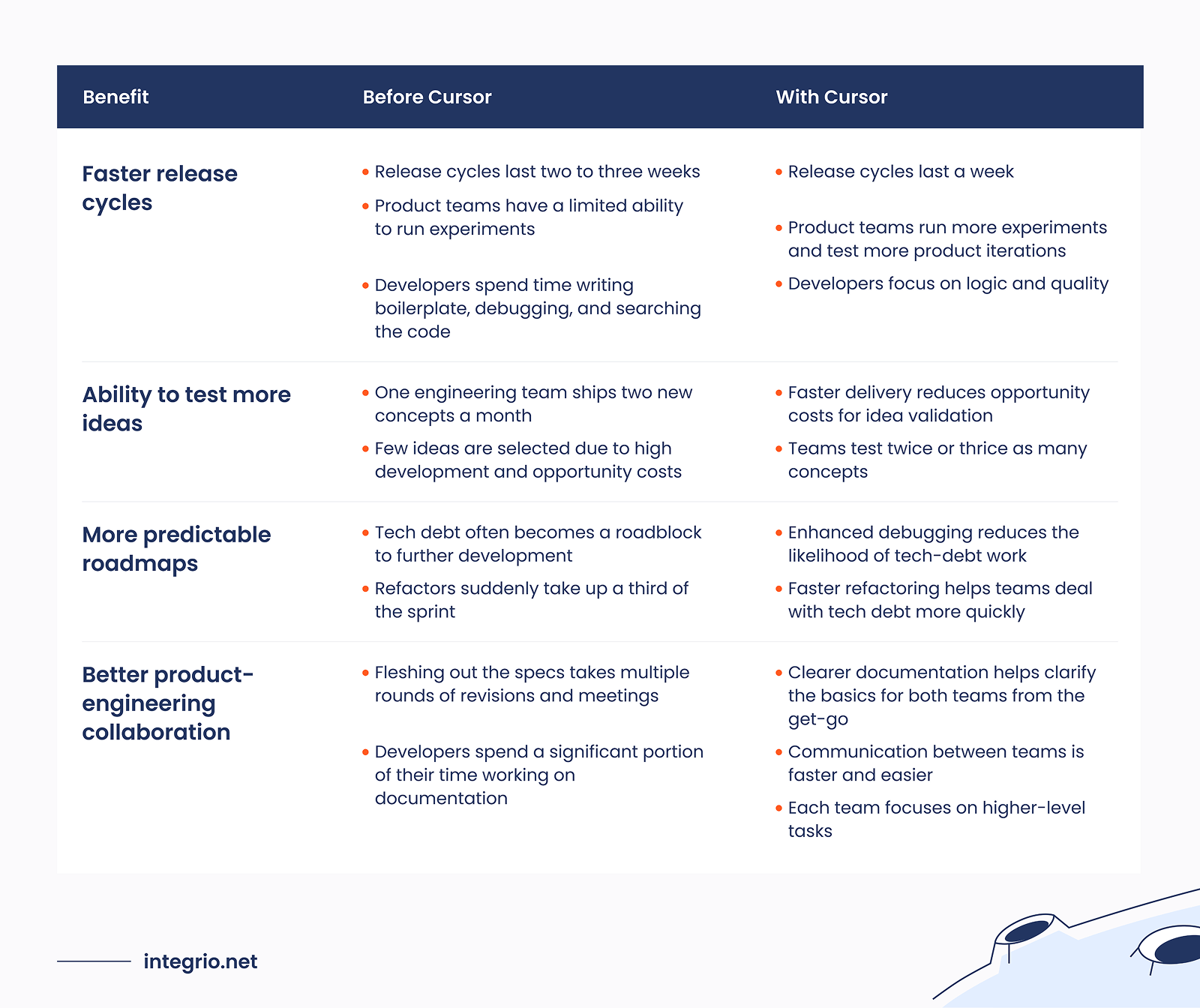
Implementing Cursor in Your Team
Before you start fleshing out the new Cursor workflows, ensure you understand its limitations. It can augment your developers’ productivity by automating or semi-automating certain tasks, but it can’t replace them altogether.
With that in mind, take these four steps to set up Cursor workflows:
Start small. Begin the transition with a pilot project that involves one to three motivated developers. Have them take note of what works and what doesn’t.
Define metrics. How will you know whether Cursor actually boosts your developers’ productivity? One word: metrics. Use both developer productivity (time on task or number of pull requests) and software quality metrics (e.g., bugs per release).
Create guidelines. These guidelines should outline the review process for AI-generated output, security checks, and style consistency. Dedicate time to prompt development to equip developers with reusable prompts for routine tasks.
Roll it out. Expand the use to the whole development team and provide a knowledge base for the guidelines and best practices. Offer training if necessary. Make sure to share your AI-powered wins with the whole team.
KPIs to Measure the Impact of Cursor
You won’t know if a specific tool indeed improves developer productivity without comparable data. We measure the impact of Cursor on our productivity using these four KPIs:
- Average time to complete a specific task or close a ticket
- Number of features shipped (per sprint or quarter)
- Bug count and time to resolve
- Time-to-onboard for new developers
We also collect direct feedback to track the developer satisfaction score. It’s an optional metric, but it allows developers to have a say in what tools they use. That’s good for culture and morale.
Measuring developer productivity is a hot topic, so be prepared. In fact, 36% of developers feel that the methods used for that purpose don’t accurately reflect it. To avoid dissatisfaction stemming from it:
- Make the process transparent and clear
- Provide constructive feedback based on the results
- Consider changing methods or metrics if developers believe they’re not accurate or relevant
Final Thoughts
Cursor AI is a productivity multiplier, not a replacement for developers. It can produce draft boilerplate code and in-line comments in seconds, freeing developers to focus on big-picture logic questions. It can’t replace them altogether.
That said, the benefits of this AI-powered IDE are obvious: faster shipping equals lower costs and more frequently deployed product iterations.
Need help switching your team to Cursor-enhanced workflows? As practitioners of AI-enhanced development, Integrio has a hands-on understanding of how to make the most out of it. Let’s talk about how we can streamline your work with Cursor with prompts optimized for maximum efficiency.
FAQ
Yes, provided you enable the privacy mode to limit access to the codebase for remote servers and model providers. Set up strict Cursor rules, vet every dependency, and maintain a prompt log, too.
With multipurpose chatbots, you have to copy-paste code, set the rules and context, and constantly switch between apps. With Cursor, you get AI-generated code suggestions or explanations without leaving the IDE, with unified rulesets ensuring consistency.
Cursor won’t replace developers because AI output must always be checked, tested, and sometimes tweaked by developers. That said, AI tools can save a team 30% to 40% of time on feature delivery and bug fixing.
Yes, Cursor works with both frontend and backend code. It supports JavaScript, TypeScript, HTML, CSS, as well as Python, Java, C#, PHP, Ruby for backend development.
Cursor can explain what code does in natural language, which is invaluable for new developers. Without it, new developers have to pick their senior colleagues’ brains when they’re available.
Track productivity metrics before and after adopting Cursor: average task completion time, features shipped per sprint, bug count, time-to-resolve, and time-to-onboard for new developers.
Contact us
